“Don’t wrap the LLM. Don’t wrap its tools either.”
AI接管你的浏览器
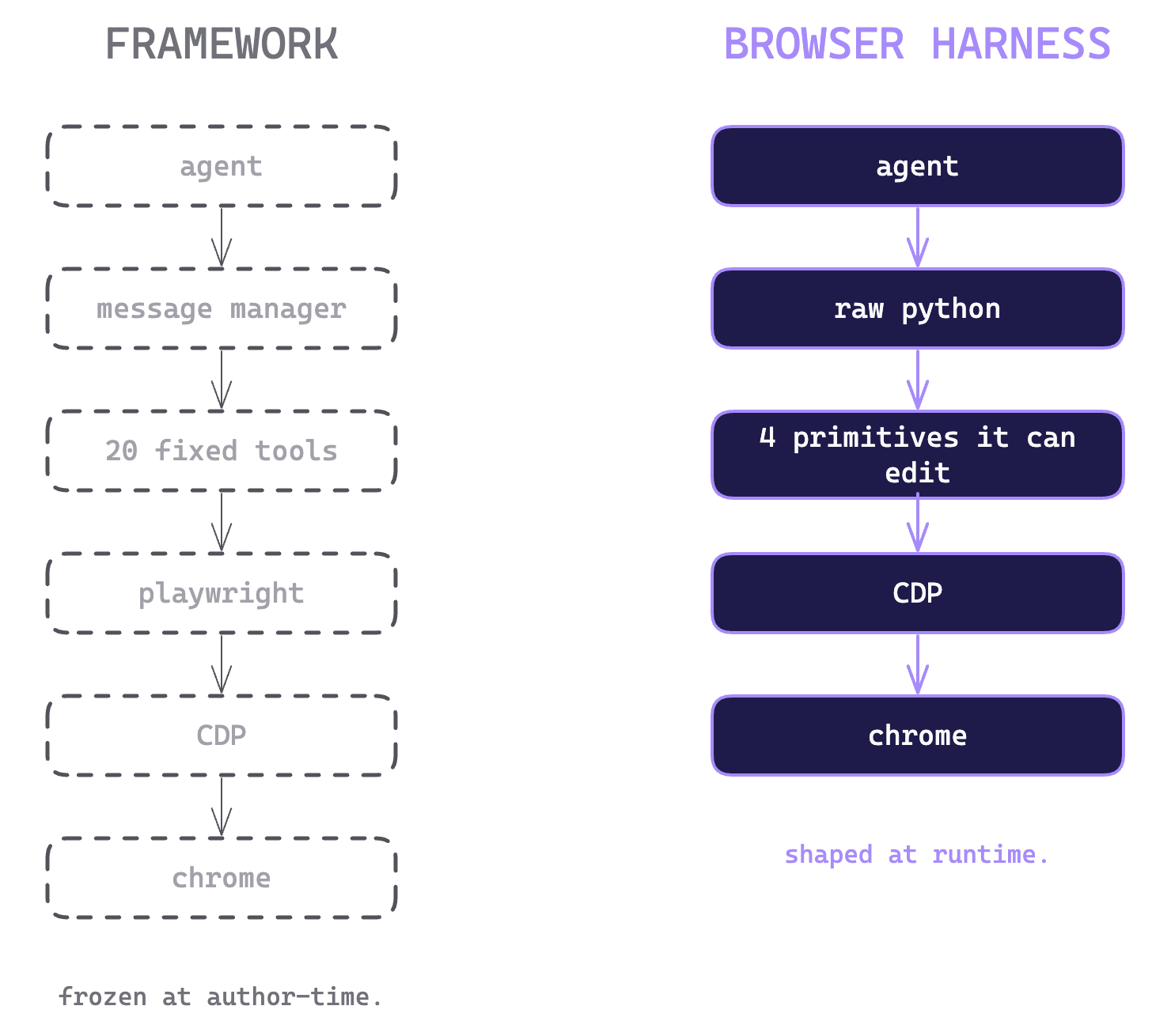
如果你希望agent可以直接帮你操作你的浏览器,例如重复性网页操作,网页下载收集资料等等,Browser Harness是一个值得关注的项目。相比于他们之前的项目Browser-use框架,前者是一个完整 Web Agent 框架,它会提供大量已经封装好的能力,而 Browser Harness 是一个极小的浏览器 harness,给 Agent 一个真实浏览器,剩下的全都交给它自己。一个简单的例子,假设任务是打开一个网站,搜索某个关键词,提取前 5 条结果。Browser-use会根据模型选择动作,选择 click / input / scroll 等 action,执行动作,再次观察,直到完成任务。但遇到框架边界之外的的任务,就需要人为打补丁,那不如把权限都交给agent本身,Browser Harness就出现了。它会自己写 helper、调试错误、调用 API、处理文件、保存成skill等等操作。两者最大的区别是把承担构建任务框架的角色交给agent还是程序员。
Browser Harness不需要编排复杂框架,只给他基础的CDP(Chrome DevTools Protocol),让Agent自己在浏览器探索完成任务,发现规律、踩坑、写 helper,经验保存成skills。
四个文件
run.py
Browser Harness 使用方式非常暴力,SKILL.md 明确说:调用方式就是 browser-harness -c ‘任意 Python’,helpers 会预导入,daemon 会自动启动,不需要手动管理。
browser-harness -c '
new_tab("https://docs.browser-use.com")
wait_for_load()
print(page_info())
'
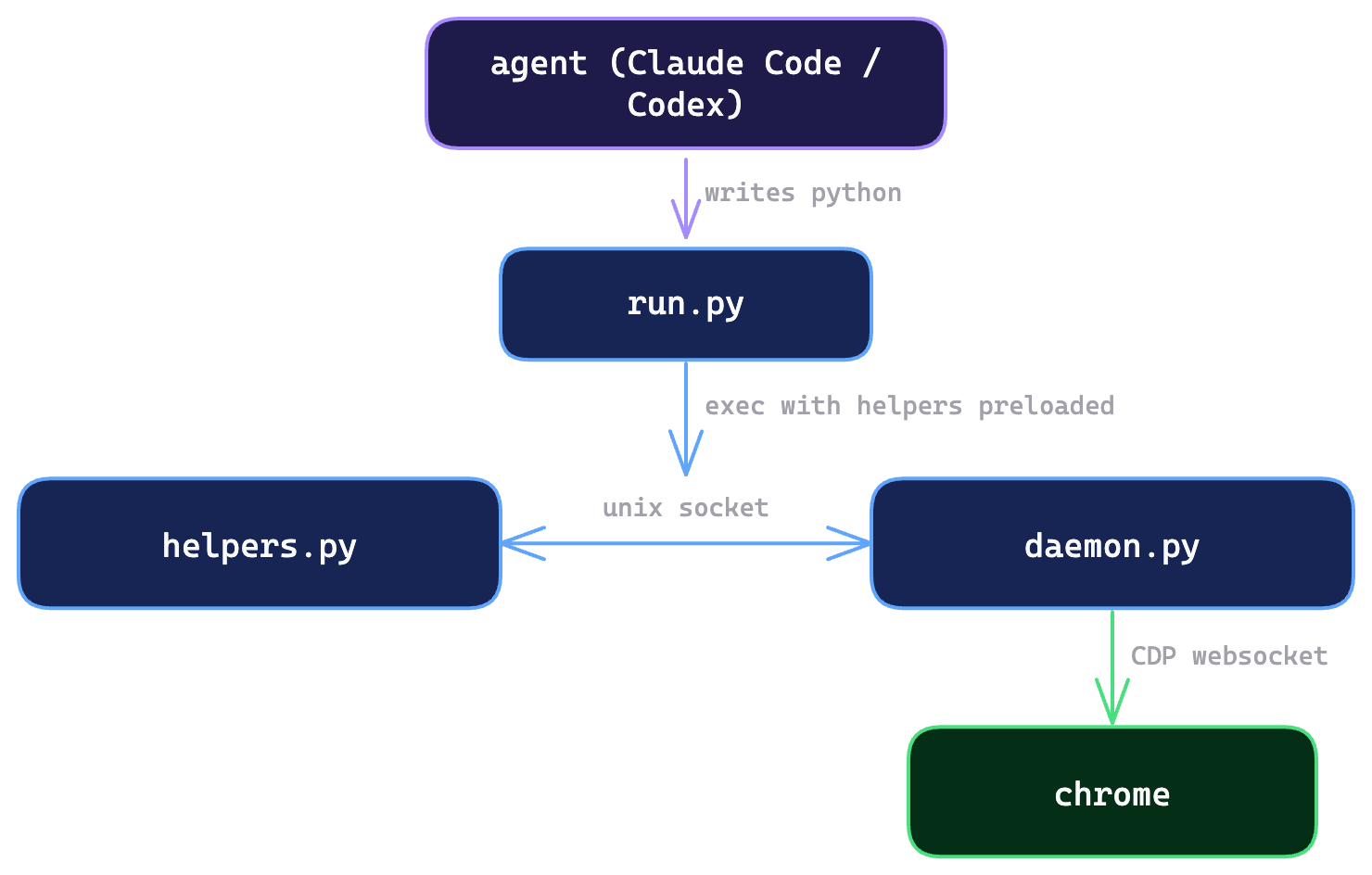
通过源码可以看到,run.py 主要做几件事:设置 Windows 输出编码、导入管理函数和 helpers、解析命令行参数、确保 daemon 启动,然后执行 -c 后面传入的 Python 代码。
def main():
    args = sys.argv[1:]
    if args and args[0] in {"-h", "--help"}:
        print(HELP)
        return
    if args and args[0] == "--version":
        print(_version() or "unknown")
        return
    if args and args[0] == "--doctor":
        sys.exit(run_doctor())
    if args and args[0] == "--setup":
        sys.exit(run_setup())
    if args and args[0] == "--update":
        yes = any(a in {"-y", "--yes"} for a in args[1:])
        sys.exit(run_update(yes=yes))
    if args and args[0] == "--reload":
        restart_daemon()
        print("daemon stopped — will restart fresh on next call")
        return
    if args and args[0] == "--debug-clicks":
        os.environ["BH_DEBUG_CLICKS"] = "1"
        args = args[1:]
    if not args or args[0] != "-c":
        sys.exit("Usage: browser-harness -c \"print(page_info())\"")
    if len(args) < 2:
        sys.exit("Usage: browser-harness -c \"print(page_info())\"")
    print_update_banner()
    ensure_daemon()
    exec(args[1], globals())
browser-harness支持一些指令:
--help      显示帮助
--version   显示版本
--doctor    检查环境
--setup     初始化配置
--update    更新工具
--reload    重启 daemon
如果用户传入的是browser-harness -c "XXXX", 最后到run.py最核心的地方三行,print_update_banner()检查/提示是否需要更新 browser-harness,ensure_daemon()确保后台 daemon 已经启动,并且已经连接到 Chrome CDP,exec(args[1], globals())把 -c 后面的字符串当作 Python 代码执行。
helpers.py
helpers.py 是暴露给 Agent 的浏览器基础操作工具,具体来说把Chrome DevTools Protocol(CDP),例如cdp(),js(),click_at_xy()等等。注意的是,browser-harness 中有核心的helpers.py 和 agent 可修改的自己的文件 agent-workspace/agent_helpers.py。
cdp()
cdp() 是整个文件的中心,它调用任意 Chrome DevTools Protocol 方法。Browser Harness 的 helper 不需要自己定义一套浏览器工具,而是直接使用 Chrome 原生 CDP。
def cdp(method, session_id=None, **params):
    return _send({
        "method": method,
        "params": params,
        "session_id": session_id
    }).get("result", {})
使用方法:
cdp("Page.navigate", url="https://example.com")
cdp("DOM.getDocument", depth=-1)
cdp("Runtime.evaluate", expression="document.title")
为了封装常见的操作,Browser Harness 避免每次直接 CDP 参数麻烦,定义了一下方法:
| function | description |
|---|---|
| goto_url() | 让浏览器跳转到某个网页,如果这个网站之前有保存过 domain-skills,它会顺便提示 Agent。 |
| js() | 在当前网页里执行 JavaScript。 |
| capture_screenshot() | 给当前浏览器页面截图,Browser Harness 很强调这个,因为 Agent 可以通过截图理解页面。 |
| click_at_xy() | 点击浏览器页面上的某个坐标。 |
| type_text() | 往当前的输入框里输入文字。 |
| press_key() | 模拟键盘按键。 |
| page_info() | 会返回当前页面的一些基本信息。 |
| upload_file() | 给网页里的文件上传框设置文件。 |
| http_get() | 直接请求网页内容,不经过浏览器。 |
daemo.py
Browser Harness 的浏览器链接守护进程,如果没有 daemon.py,每次执行 browser-harness -c "python code",那每一次都需要连接Chrome,建立 WebSocket等等操作。daemon.py 长期连接 Chrome,然后帮 helpers.py 转发 CDP 请求。
找到 Chrome CDP 地址
def get_ws_url():
    if os.environ.get("BU_CDP_WS"):
        return os.environ["BU_CDP_WS"]

    for port in [9222, 9223]:
        url = f"http://127.0.0.1:{port}/json/version"
        data = http_get_json(url)

        if "webSocketDebuggerUrl" in data:
            return data["webSocketDebuggerUrl"]
    raise RuntimeError("Cannot find Chrome CDP websocket")
连接 Chrome WebSocket
async def connect_to_chrome(ws_url):
    websocket = await websockets.connect(ws_url)
    return websocket

async def send_raw(self, method, params=None, session_id=None):
    self.next_id += 1

    message = {
        "id": self.next_id,
        "method": method,
        "params": params or {}
    }

    if session_id:
        message["sessionId"] = session_id

    await self.websocket.send(json.dumps(message))

    response = await self.wait_for_response(self.next_id)

    return response["result"]
启动 IPC server
async def start_ipc_server(self):
    server = await start_local_socket_server(self.handle_client)

    async with server:
        await server.serve_forever()
核心handle()
async def handle(self, req):
    # helpers.py 询问是否有弹窗
    if req.get("meta") == "pending_dialog":
        return {
            "dialog": self.pending_dialog
        }

    # helpers.py 切换了 tab,通知 daemon 更新 session
    if req.get("meta") == "set_session":
        self.session_id = req["session_id"]
        return {
            "session_id": self.session_id
        }

    # 普通 CDP 请求
    method = req["method"]
    params = req.get("params") or {}

    # Target.* 方法通常不需要 session
    if method.startswith("Target."):
        session_id = None
    else:
        session_id = req.get("session_id") or self.session_id

    result = await self.send_raw(
        method=method,
        params=params,
        session_id=session_id
    )

    return {
        "result": result
    }
skills.md
skills.md 明确规定了 agent 只使用browser-harness -c, 不要cd, 不要uv run,减少agent的无效探索
browser-harness -c '
new_tab("https://docs.browser-use.com")
wait_for_load()
print(page_info())
'
skills.md 还规定了怎么操作网页,并写成一个规则,先截图–>判断–>点击–>最后截图验证
Screenshots first: use capture_screenshot() to understand the current page quickly, find visible targets, and decide whether you need a click, a selector, or more navigation.
Clicking: capture_screenshot() → read the pixel off the image → click_at_xy(x, y) → capture_screenshot() to verify. Suppress the Playwright-habit reflex of "locate first, then click" — no getBoundingClientRect, no selector hunt. Drop to DOM only when the target has no visible geometry (hidden input, 0×0 node). Hit-testing happens in Chrome's browser process, so clicks go through iframes / shadow DOM / cross-origin without extra work.
Bulk HTTP: http_get(url) + ThreadPoolExecutor. No browser for static pages (249 Netflix pages in 2.8s).
After goto: wait_for_load().
Wrong/stale tab: ensure_real_tab(). Use it when the current tab is stale or internal; the daemon also auto-recovers from stale sessions on the next call.
Verification: print(page_info()) is the simplest "is this alive?" check, but screenshots are the default way to verify whether a visible action actually worked.
DOM reads: use js(...) for inspection and extraction when the screenshot shows that coordinates are the wrong tool.
Iframe sites (Azure blades, Salesforce): click_at_xy(x, y) passes through; only drop to iframe DOM work when coordinate clicks are the wrong tool.
Auth wall: redirected to login → stop and ask the user. Don't type credentials from screenshots.
Raw CDP for anything helpers don't cover: cdp("Domain.method", params).
Domain skills 机制让 Agent 在某个网站上学到了非显然经验,就应该写到 agent-workspace/domain-skills/<site>/ 里。
This section only applies when BH_DOMAIN_SKILLS=1 is set. Otherwise ignore it — agent-workspace/domain-skills/ is dormant and goto_url will not surface skill files.

When enabled, search agent-workspace/domain-skills/ first for the domain you are working on before inventing a new approach. goto_url also returns up to 10 skill filenames for the navigated host.

Useful commands:

rg --files agent-workspace/domain-skills
rg -n "tiktok|upload" agent-workspace/domain-skills
If you learned anything non-obvious about how a site works, open a PR to agent-workspace/domain-skills/<site>/ before you finish. Default to contributing. The harness gets better only because agents file what they learn. If figuring something out cost you a few steps, the next run should not pay the same tax.

Examples of what's worth a PR:

A private API the page calls (XHR/fetch endpoint, request shape, auth) — often 10× faster than DOM scraping.
A stable selector that beats the obvious one, or an obfuscated CSS-module class to avoid.
A framework quirk — "the dropdown is a React combobox that only commits on Escape", "this Vue list only renders rows inside its own scroll container, so scrollIntoView on the row doesn't work — you have to scroll the container".
A URL pattern — direct route, required query params (?lang=en, ?th=1), a variant that skips a loader.
A wait that wait_for_load() misses, with the reason.
A trap — stale drafts, legacy IDs that now return null, unicode quirks, beforeunload dialogs, CAPTCHA surfaces.
自愈循环
Agent 遇到工具不够用、操作失败、网站有坑时,不是等人类改框架,而是自己写 helper / skill,把解决方案沉淀下来,下次直接复用。相比于之前人工去打补丁,Agent会自我分析为什么失败,用底层cdp() / js() 临时解决,并把解决方案沉淀成domain skill,下次同类问题直接复用。
为什么Browser Harness 能做到self-heal?
首先,agent有底层兜底能力,即使没有现成函数,Agent 也可以直接调用 Chrome DevTools Protocol,去在浏览器做一些探索尝试,比如没有封装某个浏览器能力,Agent 仍然可以直接查 CDP 文档或试 CDP 方法。SKILL.md 里也明确写了:helpers 覆盖不了的能力,就用 raw CDP:cdp(“Domain.method”, params)。
其次,Browser Harness 不希望 Agent 去改核心代码,而是让它把任务相关 helper 写到自己的agent-workspace/agent_helpers.py下。比如 Agent 发现某一个操作经常会使用到,就会总结到agent_helpers.py,下次遇到相同问题直接调用改方法。SKILL.md 规定 task-specific edits 应该放到 agent-workspace/agent_helpers.py,核心 helpers 保持短小。
最后, Browser Harness 有 domain skills 记录网站经验,Agent 发现的是某个网站的特殊规律,就不是写通用 helper,而是写到agent-workspace/domain-skills/<site>/。比如某个网站上传页必须先等某个XHR完成,这些不是通用浏览器能力,而是网站经验。SKILL.md 规定如果学到了某个网站非显然的东西,应该写到
agent-workspace/domain-skills/<site>/,这样下次 run 不用再付同样的探索成本。
不要让 Agent 只会调用固定工具,而要让 Agent 能在失败后创造新工具,并把经验留下来。

一个官方的例子
Upload。 我们忘了加上 upload_file()。任务中途,代理点击了文件输入,grep 了 helpers.py,什么都没看到,用原始的 DOM.setFileInputFiles 写入函数,并上传了文件。我们是在阅读 git 差异时发现的。
Chunked upload。 写入 upload_file 后,代理尝试上传一个 12MB 的文件。CDP 的 Websocket 负载上限约为 10MB。它达到了极限,读取错误,切换成分块上传模式。
Gusto to calendar。 任务:把每个员工的生日都记在我们的共享日历里。需要在 Gusto 的员工标签页中导航,从 DOM 中提取日期,然后创建 Google 日历事件。
安装
在你的Claude Code 或者 Codex 中输出 prompt
Set up https://github.com/browser-use/browser-harness for me.

Read `install.md` first to install and connect this repo to my real browser. Then read `SKILL.md` for normal usage. Use `agent-workspace/agent_helpers.py` for task-specific edits. When you open a setup or verification tab, activate it so I can see the active browser tab. After it is installed, open this repository in my browser and, if I am logged in to GitHub, ask me whether you should star it for me as a quick demo that the interaction works — only click the star if I say yes. If I am not logged in, just go to browser-use.com.
随着 LLM 能力不断增强,越来越多的项目开始减少对模型的限制,让模型自行探索、总结经验,并将这些经验复用于后续任务。相比之下,过度依赖人工规则来提升效率的方式,正在逐渐显得局限。模型在突破既有规则约束的同时,确实带来了效率提升,但也引发了新的安全性思考。当 LLM 正在不断将部分框架能力内化为模型自身能力时,我们也需要重新思考:人类对 Agent 的提升,究竟应该体现在哪些方面?